Sunday, 28 July 2013

India’s average internet speed

India’s average internet speed among slowest in the world


We are among the most laggard nation when it comes to the most important aspect of tech revolution. India’s average internet speed among slowest in the world.
We don’t tire from calling ourselves technology and internet giant. But if we go by the average internet speed available to consumers in the country we must be among the most backward nations in the world. Ever heard the name of Lithuania or Romania? The two nations are among the top 10 nations when it comes to highest internet speed in the world. On the other hand India seems a laggard.
If you talk to most Indian internet users they will talk about how they have to lose time in getting the right speed and the sort of issues that continue to affect them on the daily basis and how internet providers don’t really tend to listen to their complaint. There is a chronic problem of inaction when it comes to servicing the internet connection. If your connection is lost due to myriad reasons you can be sure to not have net connectivity for the next several days till actually some miracle happens.
 
This is the reason that most internet users even in cities like New Delhi, the Indian capital, look so much disappointed with it. The latest Akamai Technologies’ State of the Internet report puts India 109th rank in the world when it comes to top peak speed average of 10.6 Mbps. It is 27% faster than the last quarter and 34% faster than last year. But when it comes to average internet connection speed, it is still 1.3 Mbps and is the lowest among Asian nations. The average internet connection speed in Korea is as high as 14.2Mbps. when it comes to global average connection speed, it is substantially higher than India’s average speed. the average internet speed in the world is 3.1 Mbps, said Akamai Technologies’ State of the Internet report.


Saturday, 27 July 2013

Triple-SIM Platform for Android Phones


MediaTek Intros Triple-SIM Platform for Android Phones

MediaTek this week introduced a new hardware platform for 3G Android smartphones that supports three SIM cards, each of which can "receive calls, transmit data, send SMS messages and remain in standby mode concurrently without consuming excessive battery life," according to the company. The "world's first triple-SIM technology for 3G Android smartphones" is aimed at emerging markets, where the popularity of multi-SIM devices is on the rise, MediaTek said.
"MediaTek has long provided state-of-art solutions for multi-SIM mobile devices. 3G triple-SIM is yet another example of that," Brian Kwon, head of product planning for LG Electronics, said in a statement.
LG Electronics utilized MediaTek's dual-SIM platform for its Optimus L4II smartphone, currently selling in Brazil. You can see that dual-SIM technology in action in the video below.
"Thanks to its groundbreaking technology, our new smartphones will significantly expand the connectivity options of our customers, and in so doing allow them to take advantage of multiple tariff plans," Kwon said.


MediaTek is also touting the user interface baked into its triple-SIM platform as a "turnkey solution" for phone makers. Users of phones incorporating the technology can adjust or turn off multi-SIM functionality on their devices via middleware the Taiwanese semiconductor firm includes in the platform stack.
The new triple-SIM platform also provides a "high level of stability," according to MediaTek, which claimed dropped and poor-quality calls are not an issue.
"In many emerging markets, multi-SIM support has become an absolute requirement. By creating a comprehensive total solution packed with premium features and advanced technologies, MediaTek is not only catering to end-user needs, but also attracting the attention of the world's tier-one device makers," said Jeffrey Ju, general manager of MediaTek's Smartphone Business Unit. "With our long line of exciting new products in the works, we expect to bring many more affordable-premium mobile device solutions to emerging markets and others in the near future."
MediaTek, long known as a supplier of ARM-based processors and baseband solutions for feature phones, has been pushing into the value and mid-range smartphone market in recent years. While top-end smartphones typically sport chipsets designed by the likes of Qualcomm, Samsung, Apple, and Nvidia, MediaTek has enjoyed solid growth with its new line of multi-core application processorsin the lower part of the market, particularly in China, India, and other emerging markets.
The fabless semiconductor firm also teamed up with Twitter last year to produce a feature phone with Twitter's mobile application pre-loaded into MediaTek's MRE middleware used in reference designs for phone manufacturers. 

Wikipedia rolls out editing tool for mobile devices

Wikipedia rolls out editing tool for mobile devices

Wikipedia unveiled a new feature on Wednesday that lets users edit posts from their smartphones or tablets.

Instead of being authored by a select group of editors, the free online encyclopedia can be edited by anyone anywhere, and at any time. So, mobile integration will most likely streamline the editing process for many users.
"Have you ever looked up something quickly on Wikipedia on your phone, noticed a small mistake, and wished you could fix it on the spot?" Wikipedia mobile web software engineer Juliusz Gonera wrote in a blog post "Now you can help keep Wikipedia and its sister projects up-to-date and accurate when you're on the go by editing from your phone."

Before today, users could only edit Wikipedia entries from desktop computers -- however, more than 15 percent of users access the site from their mobile devices. Wikipedia saw that disconnect and decided to "do more to let anyone with Internet access contribute to the sum of all human knowledge," wrote Gonera. Earlier this year, the company rolled out a trial version of mobile editing on an experimental beta site; and today, it is launching the first public release for all users. Gonera wrote that Wikipedia will continue to work on improving the mobile editing feature into the future.

Smart Namo


Smart Namo, the Narendra Modi branded Android phone


Gujarat chief minister NarendraModi will soon get a smartphone dedicated to him. Smart Namo, an independent body formed by Modi fans, has announced it will soon launch a mobile phone by the same name. The upcoming Android phone is the group members' way of showing their dedication and respect to Modi, the official website for the device says.

Smart Namo, the Narendra Modi branded Android phoneAccording to the website, Namo is an acronym for Narendra Modi as well as Next-generation Android Mobile Odyssey. Modi is popularly referred to as NaMo on social networking websites. Apart from launching the standard version of the device, the group has already starting working on the "Shri Narendra Modi signature edition" handset.

The Smart Namo group includes Gujarati businessmen who have mobile businesses in China. Ammeet Desai, the spokesperson for Smart Namo told The Wall Street Journal that they got the idea for this phone from China itself, where several products like MP3 players and smartphones are branded with their leaders' name.

The group's members will design the phone over the next month and go to Modi for his approval, the report says. Desai said that the group will establish a production plant to manufacture the handsets in Gujarat.

While it does not give a time line for the launch of the device, the group says it will launch the smartphone "very soon." The report claims that Smart Namo phone will cost Rs 16,000 at launch and have videos as well as apps related to Modi. The group will be selling the phone at cost, thus making no profit from it. Cheaper versions of the device are also in the pipeline, including a feature phone that will cost Rs 1,000.

Coming to the specs of the phone, the Smart Namo website says that the phone will have a 5-inch screen, reinforced with Corning Gorilla Glass 2. It will run on a 1.5GHz quad-core Mediatek chipset that supports dual-sim functionality and have a 13MP camera on the back. The phone will be available in four variants, as per storage and RAM.

Samsung Galaxy Tab 3


Samsung Galaxy Tab 3 launched in India

Electronics major Samsung on Thursday unveiled the much awaited Galaxy Tab 3 range of tablets.

The sleek Galaxy Tab 3, which will hit retail stores next week, is available in two variants -- voice & data and Wifi.

The Galaxy Tab 3 (311) boasts of an 8-inch screen with WXGA display. It runs on the latest Android Jellybean 4.2 OS and sports a 1.5 GHz dual core processor with 1.5 GB RAM.

The tablets sports the 'reading mode' technology, which optimises the display for illumination and tone to help in reading. It also has the 'multi-window' option that allows the user to work on two apps at the same time by dividing the screen in to two parts.

It has a 5 MP rear and 1.9 MP front camera and has 16 GB internal memory, which can be expanded to 64 GB using a micro SD card.

Besides, the tablet comes pre-loaded with Story Album and Group Play that enables users to share music, photos, files and games. It also has other apps like Samsung Hub, ChatOn, S Translator, S Travel, Pop up Video and WatchON.

The 7-inch Galaxy Tab 3 (211) is powered by a 1.2 GHz dual-core processor and 1GB of RAM. It has 8 GB internal storage, which can be expanded up to 32 GB. The tablet runs Android 4.1 Jelly Bean.

It also comes pre-loaded with services like My Education, My Offers, My Games, My Music and My Movies. Through My Education, a user can access 2,000 e-books, 1,000 learning videos, preparatory material for exams, etc.

"There is a growing demand for tablets in the education sector with more and more students using such handheld devices for reading and sharing information," Samsung Country Head (Mobile and Imaging Business) Vineet Taneja said here.

While, Samsung has priced the 8-inch Galaxy Tab 3 (311) at Rs.25,725, the other 8-inch (310) (Wifi only) version is available for Rs.21,945 and the 7-inch Galaxy Tab 3 (211) is priced at Rs.17,745.


Apple Developer site hack


Apple Developer site hack


Apple's developer portal was taken offline on Thursday 18 July. Photograph: Saeed Khan/AFP/Getty Images


A Guardian investigation has cast doubt on claims by a UK-based Turkish researcher that he hacked into Apple's Developer portal, which has been offline for more than a week.
Ibrahim Balic, who describes himself as a security consultant, claimed on Sunday that he had discovered a number of weaknesses in the site at developer.apple.com which allowed him to grab email addresses of registered developers.
Apple took its developer portal offline on Thursday 18 July. On Sunday it emailed developers warning that the site had been hacked and that some of their details might have been stolen. It has not given any more details of how the hack was carried out.
In all, Balic said he had been able to grab the details of 100,000 people registered on the site, and that he included 73 of them in a bug report to Apple. He claimed that he exploited a cross-site scripting (XSS) bug in the site, and noted 13 issues in a bug report to Apple between 16 and 20 July.
However XSS attacks generally require the attacker — which in this case would be Balic — to "infect" a page, in this case Apple's, with a malicious piece of Javascript or HTML which would then be used to extract data from a visiting user. If Balic's claim is correct, he seems to have used the XSS exploits against his own system.
Balic offered to provide proof of his hack by sharing some details of the file with the Guardian, and provided the emails for 19 people; the Guardian also extracted another 10 from an email Balic put on YouTube in which he apparently showed how he hacked the site. (He has since made the video private.)
But attempts by the Guardian two days ago to contact 29 of the group whose details Balic claims to have acquired found that seven of the emails bounced — because the email is no longer operational — and not a single one of the others has responded to a request to say whether they are registered with Apple. Nor could any of the emails or names be discovered online — which would be unusual for any active developer.
Many of the emails also belong to defunct services such as Freeserve, Demon and SBC Global — which makes it unlikely that they would have signed up as developers, as that only became possible in 2008.
Graham Cluley, an independent security consultant, commented: "Many of the names and email addresses either don't look like they would belong to Apple developers, or appear to have left no footprints anywhere else on the net." Of the set of 10 emails which appeared in the video, he said: "It's almost as though these are long-discarded ghost email addresses from years ago or have been used by Balic in his video for reasons best known to himself."
Balic told iMore that the user information that he showed in a video came not from an exploit against a developer portal, but from Apple's iAd Workbench, for targeting advertising campaigns to users. He said that a malformed web request to those servers containing just a first name or last name meant he could get more data — including a full name, username and email address for those users.
He then said that he wrote a script that generated "random" users to get more account information wherever there was a match of some sort, and used that to acquire the user details.
Balic did not respond to a request by the Guardian to explain why the emails he had apparently collected were defunct or apparently inoperational.
Apple refused to comment on the method used to hack into its site. It would not comment on whether it has called in law enforcement over the hack, or whether it has identified any suspects.
Even if the hack was not carried out by Balic, Apple has still been the target of a significant attack. However, standard iTunes Store and App Store accounts belonging to non-developers have not been affected.
The increasing delay in bringing its developer portal back online may also create problems for Apple in its preparation for the launch of iOS 7, the updated version of its iPhone and iPad software. It released the third beta for the software on 8 July, and has generally aimed for a fortnightly cycle of releases. That would imply that the fourth beta should have been released last Monday 22 July – although a year ago there was a three-week delay, from 16 July to 6 August, between the releases of the third and fourth betas for iOS 6, the current iPhone software.
The company meanwhile has set up a new "system status" page, which on Friday morning showed that only two of its 15 developer systems — for updating apps, and reporting bugs — are online.

Friday, 26 July 2013

Intex Cloud X3

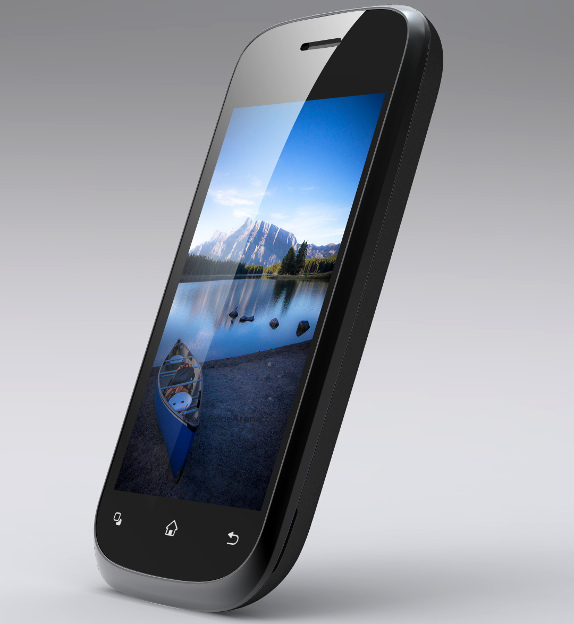
Intex Cloud X3 announced at Rs 3,790, features Android 4.2 and dual core CPU


The Intex Cloud X3 has been unveiled in India, bagging pretty noteworthy attributes for a device hailing from the sub-Rs 4,000 price category. Those who thought that being fitted with a dual core chipset is a feature meant for the mid-segment, think again, because Intex has partnered with MediaTek to prove such notions wrong.
In spite of the its retail value, the Cloud X3 is said to be the first in the country to gain steam from a dual core MT6572 chipset which holds onto a clock speed of 1GHz. A 3.5-inch capacitive touch panel rests on the phone’s front, while a VGA webcam has been drilled into place slightly above this screen. Speaking of cameras, a 2MP shooter has been embedded on the gadget’s rear.

Let’s not forget that the handset brags of packing Android Jelly Bean’s version 4.2. This ought to give it an edge over various 3.5-inch devices prevalent in the market, which run on lower editions of Google’s OS and are relatively expensive. For instance, there is the Gingerbread-driven Gionee P1 worth Rs 4,999 and Micromax Bolt A51 which has been pegged at Rs 4,599.
It is only fair that the device allows expansion of up to 32GB, bearing in mind that it offers just 115MB of internal storage space. As per the company’s statement, the inbuilt 1,450mAh battery is capable of providing up to 6 hours of talk time or 200 hours of standby.


Even though the manufacturer has said that the Intex X3 is up for grabs through various retail outlets and online, the phone cannot be found stocked with any major e-retailer just yet.
Specifications:
- 1GHz dual core MediaTek MT6572 processor
- Android 4.2 OS
- 3.5-inch capacitive touch display
- 2MP main and VGA secondary cameras
- 115MB of internal memory, expandable up to 32GB and 256MB of RAM
- 1,450mAh battery
- Dual SIM support

Wednesday, 24 July 2013

Nexus 7 tablet


                                 Nexus 7 tablet


Google and Asus on Wednesday launched the new version of the Nexus 7 tablet. While the screen of the device remains 7 inches, it now sports FullHD resolution (1920 x 1200 pixels).

The tablet is also almost 2 mm thinner and weighs around 50 grams less than the old Nexus 7. It will be available in Wi-Fi and LTE versions. In India, though, 3G version is likely instead of LTE model.

The basic model of the tablet will cost $ 229 in the US. So far, there is no word on the availability of the tablet in India. An industry insider told TOI that it is not expected here anytime soon.

Other than the bump in the screen resolution and a slimmer design, the tablet has also received better internal hardware. It is powered by a quad-core 1.5 GHz Snapdragon Pro chip and Adreno 320 graphics chip. Hugo Barra, vice-president of Android product management, claimed the processor is around 80% faster compared to the chip that powered old Nexus 7. The graphics performance in the new tablet is up by 400% compared to its predecessor.

The basic model the latest Nexus 7 will have 16GB internal storage and 2GB RAM. The model with 32GB internal storage will also be available. Unlike the old Nexus 7, the new one has a primary camera that can click 5 mega pixel images. The front camera, which can be used for video chats, sports a 1.2MP tag.

Google also announced Android 4.3 - still called Jelly Bean - at the Nexus 7 launch event held in San Francisco. The new Nexus 7 is powered by Android 4.3. The new version of Android is also available for Nexus 4, old Nexus 7, Nexus 10 and Galaxy Nexus.

Android 4.3 is similar to Android 4.2 in terms of user interface. But there are a few new features. Of these, the most important are new set of settings for multi-user accounts and ability to restrict content for different users on a device, similar to what Windows allows.

Sundar Pichai, the head of Android and Chrome divisions at Google, said that Nexus 7 has been a huge success after it launched last year. It constitutes 10% of all Android tablets sold in the last year.

"So far over 70 million Android tablets have been activated across the world," said Pichai.

At the same event, Google also announced Chromecast, a tiny dongle that can connect to any TV that has an HDMI port and allows a user to stream videos from an iOS or Android devices onto the big screen.


Wednesday, 17 July 2013

Samsung Galaxy Tab 3 in India

Samsung Galaxy Tab 3  in India


           Last month, Samsung announced its new Galaxy Tab 3 range in London and now it seems the company is ready to bring these tablets to our shores. Earlier this morning, the South Korean companytweeted a teaser image of the tablet ahead of the launch event at Delhi tomorrow. Though it announced the 7, 8 and 10.1-inch variants in the Galaxy Tab 3 range, the Samsung India e-store listings show that we might only be getting the 7 and 8-inch tablets for now. That said, there are chances that the 10.1-inch Intel-powered tablet could be heading our way some time later.
Talking of the specifications, the Galaxy Tab 3 7.0 sports a 7-inch WSVGA (1024×600 pixels) display and is powered by a dual-core Marvell processor clocked at 1.2GHz and paired with 1GB of RAM.
Other features included are 3-megapixel rear camera, 1.3-megapixel front camera, 8GB of expandable internal storage, 4,000mAh battery and it will run on Android 4.1 Jelly Bean.
The Galaxy Tab 3 8.0, on the other hand, flaunts an 8-inch WXGA TFT (1280×800 pixels) display, which is similar to the one on the Galaxy Note 8.0 but without the stylus functionality.
The tablet includes features like 1.5GHz dual-core Exynos 4412 processor, Mali 400 GPU, 1.5GB of RAM, 5-megapixel rear camera, 1.3-megapixel camera on the front, 4,450mAh battery and 16GB of internal memory that can be expanded using a microSD card. Connectivity-wise, the tablet features Wi-Fi, Bluetooth 4.0, USB and A-GPS and on the software front, the device runs on Android 4.2 Jelly Bean.
Earlier reports have suggested that Samsung is likely to price the 7-inch tablet somewhere around Rs 12,000 and the 8-inch tab at around Rs 18,000 in India. We should have more information tomorrow when we report live from the Samsung event. So stay tuned.

Tuesday, 16 July 2013

The new phablet king


At the India launch event for the Optimus G Pro, the company compared the handset to the currently available Galaxy Note II several times. While the two phones are miles apart when it comes to features and spec sheets, it is a wise comparison since the latter has a huge fan following in India.
We do a review of the LG Optimus G Pro to see exactly how good it is and whether it is a better buy than Samsung Galaxy Note II and indeed over the upcoming Note III, going by leaked specs.
Hardware and design: LG Optimus G Pro features a 5.5-inch screen, just as big as the one in Galaxy Note II. However, at first look you will see the difference between the two displays. The LG phone's screen is considerably clearer and brighter than that of Note II. This is because the smartphone features screen resolution of 1920x1080p, with pixel density amounting of 401ppi. In contrast, Note II user has to stay content with relatively low 1280x720p resolution and 267ppi pixel density. The LG phone has a huge advantage over its Samsung rival in this area.
The phone packs the same 1.7GHz quad-core Snapdragon S600 processor that we saw in LG Optimus G. The phone has 2GB RAM, 16GB internal storage, microSD card support up to 32GB and a 3,140mAh removable battery. Its connectivity features include 2G, 3G, Wi-Fi, Bluetooth 4.0, microUSB, infrared and NFC. On the back, you get a 13MP camera with LED flash, while a 2MP camera is placed in the front. All in all, LG Optimus G Pro has all the makings of a top-end phablet.

Coming to design, you will find that LG Optimus G Pro vastly differs from its sibling Optimus G. Instead of the finely cut, sharp edges that defined the look of Optimus G, you fill find that the new phablet is characterized by curves. In fact, it looks quite like Note II, albeit slimmer and longer. Nevertheless, the phone feels good in the hand and all buttons are easy to access, though we feel that the positions of the volume rocker and QMemo key should be interchanged as the former is used more often.
The phone is made entirely using plastic, instead of premium materials like glass and metal. At 172gram, it is not the most lightweight phablet in the market today, but still weighs lesser than Samsung Galaxy Note II and Sony Xperia Z Ultra.
The front holds the secondary camera and the usual set of sensors above the screen and the three-key layout below it. The audio jack and IR blaster are on top of the phone, while the microUSB port is at the bottom. On the left is the QMemo shortcut key as well as the volume rocker, while the Power/Lock button is on the right. The speaker grille sits on the left side of the rear camera, while the LED flash is on its right.


Apple unveils new versions of Logic Pro, Mainstage


Apple unveils new versions of Logic Pro, Mainstage


CUPERTINO, CALIFORNIA: Apple today unveiled Logic Pro X, the latest version of its digital audio workstation and MIDI sequencer. The software now features a new interface, creative tools, and an expanded collection of instruments and effects. Along with this, the company also released MainStage 3, the latest version of its live performance companion app for Logic Pro X. MainStage 3 boasts of a new user interface and maintains compatibility with the new Logic Pro X plug-ins, patches and smart controls.

Logic Pro X now features a streamlined interface in order to provide access to advanced tools and functionality for more technical tasks. The updated software now includes Drummer, a virtual session player that automatically plays along with any currently playing song in a wide variety of drumming styles and techniques. Designed to work with Drummer, the new Drum Kit Designer plug-in enables users to build their own custom kit using a diverse collection of professionally recorded snare drums, toms, hi-hats and cymbals.

Another new feature is Flex Pitch, which provides integrated pitch editing for audio recordings. Track Stacks lets users organize and collapse multiple tracks into one, or can be used to create layered instruments. Smart Controls have provision for manipulating multiple plug-ins and parameters with a single move. The mixer in Logic X Pro has been improved and now helps manage mix sessions more efficiently, with increased visibility into signal flow and dynamics and faster ways to manipulate channel inserts.

Apple has added a total of nine new plug-ins in the software in the latest update, including Arpeggiator, Retro Synth, Vintage Keyboards and Bass Amp Designer. Apple also introduced Logic Remote with this update, which enables users to control Logic Pro X from the iPad.

"Logic Pro X is our most powerful version yet, with advanced tools and a modern new interface designed to streamline the process of creating professional quality music," said Philip Schiller, Apple's senior vice president of worldwide marketing.

"Logic Pro was critical to writing and recording our debut album Night Visions, so we couldn't wait to get our hands on Logic Pro X," said Wayne Sermon, guitarist of the Platinum-selling band Imagine Dragons. "We love the new design, and the creative features of Logic Pro X have already been inspiring us to write new material while we're on tour."

Logic Pro X and MainStage 3 are available from today via Mac App Store for Rs 11,500 and Rs 1,650, respectively.
A

An app to sync music from various devices


Now, an app to sync music from various devices


A team of students from a UK university has developed the prototype of an app that allows an infinite number of devices to play music simultaneously.
The team from Exeter University has won a prize of 33,100 pounds to further develop the app, SoundSynk, in innovation at the Imagine Cup, a global student technology competition held in Russia.
SoundSynk connects phones and other devices through a so-called artificial mesh network, allowing them to play the same song on all devices in perfect harmony.
The team has so far tested it on 75 devices and hope the app will be available across all platforms in August,
"With this technology, we can create hyper-local social networks. SoundSynk is the first practical use of this technology and we are all very excited about its future
applications," said student Rob Parker.
The team, including Edward Noel, came up with the idea late on a Saturday night in February. They were playing Sweet Nothings by the DJ, Calvin Harris, on a laptop and they wanted to have it louder as they brainstormed.
"Being students we wanted to have a little rave but the volume was not sufficient," Alex Bochenski said.
"At this point we did the age-old technique of lining up all of our phones, laptops, tablets and trying to play the song at the same time," Bochenski said.
It didn't work - but it sparked the idea of the app that would eventually see them beating teams from Slovenia and Thailand in the innovation category.
"We developed a prototype of the product in 24 hours for the regionals of the Imagine Cup," Bochenski said.
Eighty-seven student teams from 71 countries competed in the worldwide finals of the Imagine cup sponsored byMicrosoft.

Upgrade Windows XP

Windows XP users advised to upgrade 'immediately' due to security reasons


Indian cyber-security sleuths have issued an alert for those using the popular 'Window XP' as operating system in their computers and laptops and advised "immediate" upgrade of software against hacking attempts.Software giant Microsoft had announced that it is going to stop support services to 'Windows XP' OS from April 8 next year and according to cyber-space authorities monitoring the Indian internet systems, the decision will have a direct effect for the all the users working on the same OS.

"The end of support of Windows XP Operating System means that Microsoft will not provide security updates, non-security hotfixes, free or paid assisted support and any online technical support for the Windows XP. In the absence of patches and security updates for the Windows XP OS,  the computer  systems  would  be  at greater risks and could be easily compromised by the hackers.
"There would also be compliance issues due to un- supported and un-patched components in the   IT   infrastructure   which   may   result   in      non-compliance    and    suspension   of certifications  by   the certifying and auditing organizations.
The software vendors and hardware manufacturers will also stop support for Windows XP on their new versions and models," the Computer Emergency Response Team-India (CeRT-IN) said in its latest advisory to computer users in India.

"It is recommended that all the users and organisations using Window XP OS in their environment should immediately   plan  for upgradation   to   the   latest   available OS according to their requirement and test software applications well before April, 2014," it said.
According to officials, the maximum of Indian computer and laptop users operate on Windows platform and after the recent declaration, users should keep themselves informed about the new and secure OS available in the market.
Microsoft had initially released Windows XP OS in August 2001. The current release version of Windows XP is called the Windows XP Service Pack 3.
Since then, three successor versions of client based OS namely Windows Vista in November 2006, Windows 7 in July 2009 and Windows 8 in August 2012 were released by Microsoft.
The latest client based OS available from the Microsoft stable is Windows 8.

BlackBerry Q5


 BlackBerry Q5 a solid phone, but is Rs 24,999 


Review: BlackBerry Q5 a solid phone, but is Rs 24,999 price tag too steep?

A few years ago, BlackBerry was a product for the classes and not the masses. If you flaunted a BlackBerry, you were surely someone who mattered. And then came the very successful Curve series, which made BlackBerry a hit even with college students on a shoestring budget.
But ever since the premium Z10 was launched globally on 30 January this year, there has been no BlackBerry 10 smartphone for the price-conscious, middle-class Indian, what with both the Z10 and its QWERTY sibling, the Q10, priced above Rs 40,000.
Finally, BlackBerry’s mid-range offering, the Q5 is here and it’s got a lot riding on it—the Q5 is BlackBerry’s built-for-developing-markets BlackBerry 10 smartphone, and India is among the largest developing markets. Ergo, the Q5 has its work cut out in India.
Form Factor
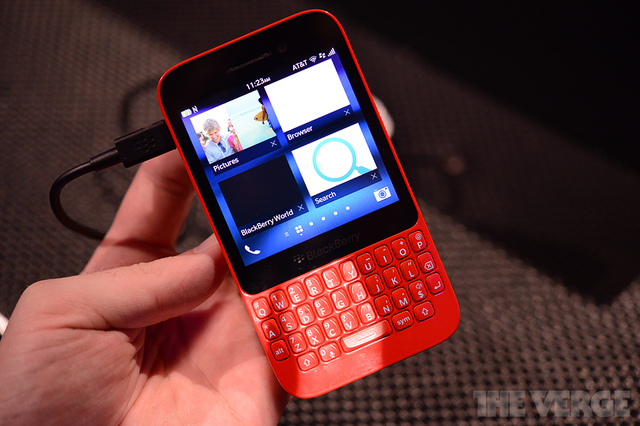
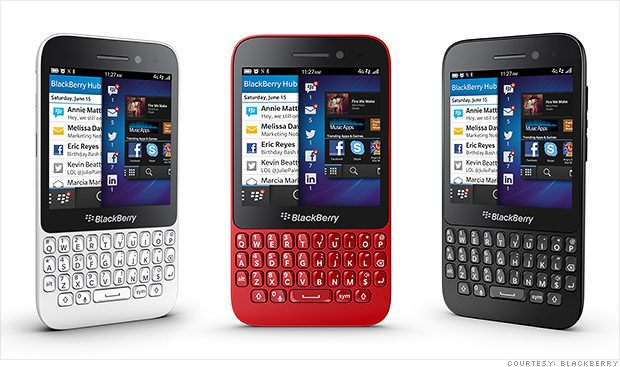
Simplicity seems to be the overriding design theme of the Q5. Granted, even the Z10 wasn’t exactly flashy, but the Q5 is perhaps a tad too Plain Jane from a design perspective. It looks much better in red, though. It’s all-plastic, but thankfully, feels solid and is actually quite sturdy—a nasty accidental drop didn’t leave even a nick.
Shape wise, the Q5 reminded me of the Sony Xperia Tipo, albeit a thinner version and with a QWERTY keyboard, which is not a nice comparison, considering the Tipo is Sony’s cheapest offering.
Buttons that double up as volume control and camera buttons in camera mode are on the top right, with a mute button in between that also doubles up as a pause button and for initiating voice control, exactly like on its far more expensive sibling, the Q10.
The BlackBerry Q5 looks good in redOn the top is the power/lock button (the only piece of chrome on the smartphone, if you leave the BlackBerry logo on the back) and a 3.5 mm audio out. On the left side, towards the top half is the microUSB port. The big deletion is the microHDMI port, for cost reasons I guess.
The back of the Q5 isn’t removable, which is a first for BlackBerry as far as I can remember. This leaves a small flap under the microUSB port where you can insert a microSIM and microSD card. The flap may be the only weak link in what seems to be solid build quality.
If it accidentally opens and gets caught in a battle with something in your pocket or purse, it doesn’t look like it can hold its own for too long. I would have much preferred the tray system that’s available on other smartphones with non-removable batteries.
There’s a 5 megapixel 1080p HD camera with an LED at the back and a 2 megapixel 720p HD front camera. An LED indicator is at the top of the front display next to the 2 megapixel camera.
There’s no grip at the back thanks to the smooth plastic back with a slightly raised BlackBerry logo in chrome, but thanks to its shape it fit in well in my hand and I had no issues with the Q5 slipping out. It’s light too, at 120 gms, and with dimensions pretty much like that of the Q10, 4.72-inches tall, 2.59-inches wide and 0.42-inches deep.
Clearly, the Q5 is aimed at those who want a keyboard and a cheaper option than the other BlackBerry keyboard warrior, the Q10. But just like the keyboards on the Bold series were far superior to those on the Curve series, the difference between the Q5 and Q10 keyboard is like chalk and cheese. While the Q10 is silent and gentler to the touch, the Q5 is audible and not-so-soft.

But make no mistake, it’s still superior to the keyboards being dished out by the few other manufacturers who still make smartphones with physical QWERTY keyboards. But like on the Q10, if you are a BlackBerry user, you’ll notice the traditional BlackBerry touchpad and navigation keys are missing and the only navigation possible is through screen gestures, something you’ll take a few hours if not days to get used to. But once you do, you’ll realise why BlackBerry 10’s gestures are far better than the older trackpad navigation.
Display
The square, sharp 3.1-inch touchscreen with 720 x 720 resolution at 329 pixels per inch (PPI) is both much nicer and larger than displays on earlier BlackBerry 7 smartphones. It’s actually, the same size as on the Q10, but is a LCD TFT panel as opposed to the Q10’s Super AMOLED.
Small text is easily readable and there’s no fuzziness anywhere on the screen—it’s super sharp. The display is bright and colours are rich and vivid. However, just as on the Q10, the 1:1 aspect ratio means watching video is a pain with the video a occupying about 50 percent of the screen in the middle and black bars on the top and bottom.
While BlackBerry has not revealed if the glass is Gorilla glass, in the few days it spent in my trouser pocket I saw no scratches—this does seem to be high-quality, scratch resistant glass.
Performance
At the heart of the Q5 is a Qualcomm Snapdragon S4 processor with 1.2 GHz dual-core CPUs. If you compare just the specs with say an Android smartphone at the same price point, and you just go for mere specs, there’s no point in reading any further.
However, if you look beyond mere specs to user experience, you’ll realise the 1.2 GHz dual-core processor works perfectly fine with the Q5 and is aided well by the 2 GB RAM on board. Performance is smooth and responsive in most cases, except perhaps CPU-intensive games. The great part if you’re a BlackBerry 7 user looking to upgrade, is that you can finally kiss the frustrating hourglass/clock goodbye. On the memory front, there’s 8 GB of internal memory, which can be extended by a hot swappable microSD card of up to 32GB capacity.
Software
The Flow user interface is gesture based, designed for single handed use. No more of the old, open app, close app, click on home button business.
A simple swipe upwards from the BlackBerry logo just above the keyboard gives you a ‘Peek’ from any application. Peek allows you to see why the front LED light is blinking without closing the application. If it’s important enough (say, a work e-mail), then you swipe right into the Hub. You can define what goes into the BlackBerry Hub—easily the best iteration of a communications centre in any smartphone OS today.
Everything from BBM to text messages to e-mail to Facebook, Twitter, LinkedIn, GoogleTalk, Foursquare, calls, voicemail and more is in the Hub. And with BlackBerry 10.1 there’s the old PIN messaging which the BlackBerry faithful wanted too.
Swipe right and you come to the live application grid where up to eight applications can be open at any time, though the apps open start closing automatically, with oldest app open closing first, once you open newer apps.
Swipe even further right and you come to the application deck where icons are laid out in an easy-to-read grid, and on a screen this small, perhaps a bit too easy to read. I would have preferred smaller icons. A ‘long press’ option allows you to remove or move apps around with a ‘drag on top’ option to create folders. However, you have to arrange icons manually in case you want to place frequently used icons on the first grid screen.
I wish BlackBerry allowed a few options here, such as alphabetical arrangement or most-used icon arrangement. Swipe down from the top bezel and the settings menu will drop down. But if you are a BlackBerry 7 user you will notice that the granularity that was available earlier is missing. For instance, earlier I could set a notification for every e-mail box, which provided me audible differentiation for work e-mail, but that’s missing here.
Word suggestions appear at the bottom of the screen and are quite useful for someone who types with one finger, though hardly useful for two thumbed typists like me.

Instant Action is another cool keyboard-dependent feature. Instant Action powers up universal search whenever you start typing and allows you to find apps and features, search, etc, and all you then do is tap the app or feature that appears. Instant Action allows you to perform tasks far more quickly than tapping around on the touchscreen to find what you need. So, if I want to send an e-mail to Niraj, I just type “email Niraj” and the Q5 shows me an option where I can compose an e-mail to Niraj instantly as opposed to clicking on the e-mail icon, then compose, then start typing the name. It saves time because rather than go to the e-mail app, I can start composing an e-mail from anywhere. This works for BBM, calls, etc, too.
BlackBerry power users who loved traditional BlackBerry keyboard shortcuts such as ‘C’ for Compose, ‘T’ for going instantly to the top of the screen, ‘B’ for the bottom, ‘F’ for Forward, etc, will find them all on the Q5. There are over 200 such shortcuts for the power user. And unlike full-touch smartphones, QWERTY keyboard smartphones give you far more options for Speed Dial where literally each letter of the alphabet can be used as a Speed Dial entry.
On the browsing front, though the Q5 packs in a great HTML5 browser that is highly rated and very capable–it even supports Adobe Flash; the small screen size is painful for browsing as it is for watching videos. BlackBerry has thrown in a welcome Reader mode though, which strips the webpage of everything other than text and few pictures and is very useful for reading.
NFC (Near Field Communication) is supported on the Q5 and while mobile wallets may be some time away in India, it’s useful for sharing files and the Smart Tags app makes it even more useful.
Camera
The Q5 sports a 5 megapixel rear camera with flash that is capable of recording in 1080p and there’s a 2 megapixel front camera, capable of recording in 720p. While you can argue that mere specs alone don’t matter on processors but overall user experience does, the same can’t be said for cameras. And here it’s a fact that at this price point, the BlackBerry Q5 is a laggard in the camera department.
Shooting modes for this camera include Normal, HDR, Stabilisation and Burst mode. Scenes gives you the choice between Auto, Action, Whiteboard, Night and Beach or Snow. There are 4:3, 16:9 and 1:1 aspect ratios on offer. In the HDR (High-dynamic-range) mode the Q5 will click two pictures at different exposures and then average the two together. You can choose between the regular picture and the HDR-enhanced picture.
The TimeShift camera captures multiple images in a burst and then detects faces in the picture and allows you to choose the best profile shot of each person in the picture with a simple zoom and toggle option. This way, you can ensure no one’s blinking or looking away and you get that perfect group shot you wanted. On the camera front, perhaps this is the coolest selling point for the Q5.
The built-in photo editor app has some nifty features for post-processing. Photo quality is decent in good light, where colours are well-defined and accurately reproduced, though we had some problems with auto focus. On normal mode the camera didn’t do very well in artificially lit indoor areas like an office. Colours looked washed out and pictures were terribly grainy. However, the camera did a decent job in very low light with flash. This is smartphone with average cameras.
With Skype now available on BlackBerry 10, the front shooter is great for Skype, BBM Video (which will soon be available on iOS and Android) and for mobile self portraits.


Review: BlackBerry Q5 a solid phone, but is Rs 24,999 price tag too steep?

Battery
Android is king of the smartphone heap in India and that pretty much means battery woes are very common among Indian smartphone users. Although non-removable , the BlackBerry Q5 sports a 2180 mAh battery. This means that while any Q5 user will lose an argument on just specs with an Android user who has an Android smartphone at a similar price point, the battery argument will be won hands down by the Q5, with the smaller screen helping too. In actual use on 3G and withWiFi constantly on, the battery lasted me nearly 28 hours.
On a day trip to Delhi that included early morning and late night flights and where I have never seen a smartphone battery lasting me without a battery swap or a recharge thanks to faster battery drain because of roaming, the Q5 lasted me right through, dying just after I got back home.
Applications
BlackBerry 10 today features over 120,000 apps on offer officially through BlackBerry World. But big names like Instagram, Google Maps, etc, are missing. However at the launch, BlackBerry confirmed that BlackBerry Maps is coming to India soon, which is a welcome move. In addition to this, the complete MapMyIndia maps solution will also be available for free with the Q5.
Maps aside, if you like a bit of tinkering, you can side load the Android version of Google Maps (and Instagram, Flipboard and thousands of other Android apps) quite easily. There’s even a Google Chrome app that makes the side loading job quite simple, and many websites provide .bar files that are converted from Android .apk files. And with a BlackBerry 10.2 reportedly in the works, there should be support for the Android 4.2.2 runtime soon, which means you can run many, many Android apps perfectly. As an example, see how Facebook Home works perfectly on BlackBerry 10.2.
Connectivity
The Q5 is also being touted in some markets as 4G LTE ready, but it won’t work with Reliance’s awaited 4G LTE launch, which is expected this financial year, as the 2300 MHz LTE band that will be used in India is not supported. However, when you roam in the West, you should get blazing fast data speeds. Sensors on board include an accelerometer, a magnetometer, a proximity sensor, a gyroscope and an ambient light sensor, besides a built-in digital compass.

The BlackBerry Solution
BlackBerry is never about the hardware alone, but about the solution and the Q5 will be squarely aimed at the enterprise market too, where many CIOs still swear by BlackBerry security and the manageability of devices. Employees clamouring for newer choices compared to BlackBerry 7 smartphones may be appeased by mass rollouts of the Q5.
On the work front, BlackBerry Balance separates work and personal spaces and you get two completely separated spaces (right down to the OS layer, which is unmatched in smartphone OSes). One is for work (with a separate wallpaper too, if you like), with work approved apps and another is for personal use with whatever you want. Everything is separated and even if you get a work calendar notification when you’re in the personal space, you won’t be able to see details of the meeting, just basic information that doesn’t compromise work security. You cannot copy content from area to another—so no one can copy text from a work e-mail and post it to Facebook in the personal area. And going between work and personal areas is as simple as one swipe down. And neither can your system administrator access your personal area where your personal photos, etc, are stored.
Docs To Go also comes gratis—it is very handy for viewing and editing Word, PowerPoint and Excel documents and usually compatible with the latest versions of Microsoft Office.


 WHAT I LIKED
•         Great battery life
•         Sharp display
•         Good keyboard with Instant Action takes traditional BlackBerry productivity shortcuts to a new level

SPECS:
Processor: Qualcomm Snapdragon S4 processor with 1.2 GHz dual-core CPUs
Memory: Internal Memory: 8 GB storage
RAM: 2 GB RAM
Hot-swappable MicroSD: up to 32 GB
Dimensions
Height: 120 mm / 4.72 in
Width: 66 mm / 2.59 in
Depth: 10.8 mm / 0.42 in
Weight: 120 gms
Display
Size: 3.1-inch diagonal / 1:1 aspect ratio
Display Type: TFT LCD
Display Size : 720 x 720 pixels, 3.1 inches (329 ppi pixel density)
24-bit colour depth
Battery
2180mAH non-removable battery
Battery Life claimed
Up to 12.5 hours talk time (3G)
Up to 14 days standby time (3G)
Connectivity
Network Bands
Quad band LTE (100/50 Mbps) 3, 7, 8, 20 (800/900/1800/2600 MHz)
Quad band HSPA/UMTS (DC 42Mbps) -1, 2, 5/6, 8 (850/900/1900/2100 MHz)
Quad band GSM/GPRS/EDGE (850/900/1800/1900 MHz)
Wi-Fi
802.11 b/g/n
2.4 GHz
Mobile Hotspot
DLNA
Bluetooth
Bluetooth, Bluetooth 4.0 Low Energy (LE)
GPS
Assisted, Autonomous and Simultaneous GPS
NFC
Camera
Main camera: 5 megapixel auto-focus camera with Flash, continuous and touch to focus, image stabilization
Digital Zoom (5x)
1080p HD video recording
2 DOF (Degrees of freedom) video stabilization
Time Shift mode for pinpointing and adjusting individual elements of your picture
Front camera
2 megapixel fixed-focus camera
Image and video stabilization
Digital Zoom (3x)
720p HD video recording
Audio & video formats
3GP, 3GP2, M4A, M4V, MOV, MP4, MKV, MPEG-4, AVI, ASF, WMV, WMA, MP3, MKA, AAC, AMR, F4V, WAV
Advanced Sensors: Accelerometer, Magnetometer, Proximity sensor, Gyroscope, Ambient light sensor